
They do not.
Each technology can play a useful role, but they solve different problems. Understanding those differences can help a business owner look past the terminology and determine what will actually improve the way work gets done.
What Is a Workflow?
A workflow is the sequence of steps required to complete a business process. It may begin when a customer submits a form, an employee receives an email, a document is uploaded, or a transaction reaches a certain stage.
Consider a customer requesting an estimate. Someone may need to collect the customer’s information, review attachments, determine the appropriate service, check pricing, prepare the estimate, send it, schedule a follow-up, and record the outcome. All of those steps together form a workflow.
In many businesses, workflows develop gradually rather than being intentionally designed. One step may happen in email, another in a spreadsheet, and another in an older database. Documents may be stored in shared folders, while follow-ups depend on calendar reminders, handwritten notes, or an experienced employee remembering what happens next.
The process may work, but it often requires people to repeatedly move information between disconnected systems. That is where delays, missed steps, duplicated work, and inconsistent results begin to appear.
"Most businesses do not need to replace everything they already use. They need a smarter workflow that connects the old and the new, automates the repeatable work, and keeps people in control where judgment matters."
Levi Beers, CEO, Keystone Web Studios Tweet
What Is an AI Workflow System?
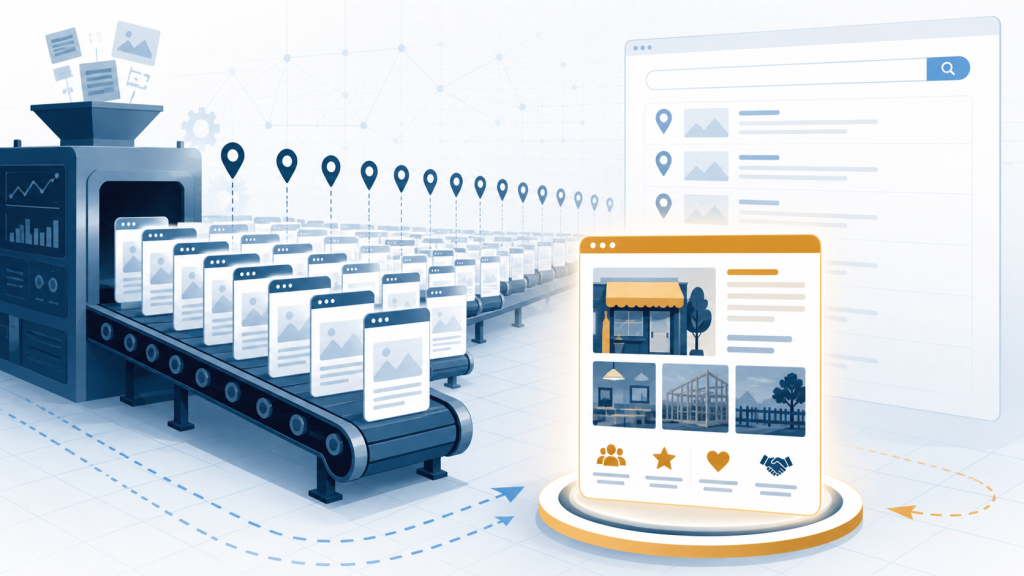
An AI workflow system is a connected business process that combines artificial intelligence, traditional automation, software integrations, business rules, and human decision-making. It does more than generate an answer or perform one isolated task; it helps move work from one stage to the next.
A well-designed system may receive information, interpret it, organize it, perform approved actions, and route the result to the appropriate person. It can also pause for human review, continue after approval, and maintain a record of what happened.
The word system is important. Artificial intelligence is only one component. The complete solution also includes the people involved, the software they already use, the rules governing the process, the information being handled, and the controls that determine what can happen automatically.
The purpose is not to add AI simply because the technology is available. The purpose is to make a real business process faster, clearer, more consistent, and easier to manage.
ChatGPT Assists With Individual Tasks
ChatGPT is a general-purpose AI assistant. A person provides instructions or information, and the system produces a response based on that interaction.
An employee might use ChatGPT to draft an email, summarize meeting notes, rewrite a document, explain a complicated topic, or prepare the first version of a proposal. These uses can save time, especially when the employee already understands the work and can evaluate the result.
However, the employee usually remains responsible for starting the interaction, supplying the relevant information, checking the response, copying it into another system, and deciding what happens next. ChatGPT may assist with one step, but it does not automatically manage the larger business process.
An AI workflow system places that capability inside a defined process. Instead of relying on an employee to manually copy an email into ChatGPT, the system might identify the request, extract important details, check for missing information, prepare a draft response, send it for review, and record the approved result.
A Chatbot Provides a Conversation Interface
A chatbot allows a customer or employee to interact with software through conversation. Some chatbots follow a fixed script, while more advanced versions use AI to understand questions and respond in natural language.
A chatbot can answer common questions, guide someone through an intake process, collect contact information, or help a user find the correct service. These functions can improve access to information and reduce the amount of routine communication handled by employees.
The conversation, however, is only one part of the process. The more important question is what happens after the chatbot collects the information.
Does the request enter the correct system? Is the information checked for missing details? Does the appropriate employee receive it? Is a follow-up created, and can the request be tracked through completion?
A chatbot communicates with the user. An AI workflow system ensures that the resulting work continues.
Automation Follows Defined Rules
Traditional automation works best when the trigger and required action are predictable. The basic instruction is usually: When this happens, do that.
For example, a business may automatically send a confirmation after a form submission, notify an account manager when an invoice becomes overdue, or create a follow-up task when a sales opportunity enters a new stage. These automations are reliable because the rules are clearly defined.
The limitation is that business information is not always structured or predictable. Customers describe similar problems in different ways, documents arrive in different formats, and emails may contain several requests at once. Important facts may be buried in paragraphs, attachments, scanned forms, or employee notes.
Traditional automation can move that information, but it may not understand what the information means. AI can interpret or organize the input first, after which conventional automation can perform the repeatable actions that follow.
Strong AI workflow systems use both approaches. AI handles ambiguity, while traditional automation handles predictable execution.
An AI Agent Can Choose Among Approved Actions
An AI agent is software that can work toward a defined goal, use available tools, evaluate information, and determine what action to take next. This makes it more flexible than an automation that follows only a fixed sequence.
For example, an agent might review a customer’s history, search approved business information, compare several documents, request missing details, prepare a response, or recommend the next step. Depending on its permissions, it may also update a system or assign work to another person.
An agent is not automatically a complete workflow system. It is better understood as a capable participant operating inside one.
The workflow system defines what information the agent can access, which actions it may perform, when human approval is required, and what should happen when the agent is uncertain. It also establishes how actions are recorded and who remains accountable for the final result.
A business may use several agents within one workflow, or it may improve a process without using an agent at all. The goal is not to use as much AI as possible; it is to apply the appropriate technology at the right points in the process.
How the Technologies Fit Together
ChatGPT responds to a person’s instructions. A chatbot provides a conversational interface. Automation performs a predefined action when a known condition occurs. An AI agent can interpret a goal and choose among permitted actions.
An AI workflow system connects these capabilities to the complete business process. It coordinates the people, information, software, rules, approvals, and follow-up steps required to produce an outcome.
For example, a chatbot might collect a customer’s initial request. AI could then classify the request and extract important details, while automation creates the appropriate record and notifies an employee. An agent might prepare a recommended response, but the employee could remain responsible for reviewing and approving it before anything is sent.
The individual technologies matter, but the value comes from how they work together.
Existing Technology Does Not Have to Be Replaced
A common misconception is that adopting AI requires a business to replace all of its existing software. For many established companies, that would be expensive, disruptive, and unnecessary.
Business workflows often span several generations of technology. A company may rely on industry-specific software installed years ago, a custom database, modern cloud applications, spreadsheets, shared folders, email, PDFs, and processes known primarily by experienced employees.
Some of those systems may be old, but they may still contain valuable information and support essential operations. Replacing them can introduce more risk than improvement.
An AI workflow system can often be designed around the technology that already exists. It may connect an older database to a newer portal, extract information from documents before approved data enters an existing system, or add notifications and review steps around software that cannot easily be replaced.
Modernization does not always require tearing everything down. In many cases, the better approach is to preserve what still works, connect what is disconnected, and automate the manual effort occurring between systems.
Where AI Can Accelerate Existing Work
AI is especially useful when employees spend significant time reading, interpreting, organizing, comparing, or rewriting information. These activities are common in document-heavy and communication-heavy workflows.
A system might use AI to extract names, dates, amounts, or other details from documents. It could categorize incoming requests, summarize lengthy records, compare information across files, identify missing details, or turn unstructured notes into an organized draft.
This does not require removing the employee from the process. Instead, the system performs the first pass and gives the employee a more complete starting point.
The employee can then focus on verifying the information, resolving exceptions, communicating with the customer, and making decisions that require experience or judgment. The result is not simply faster AI output; it is a more efficient division of work between the system and the people responsible for the outcome.
Human Review Must Be Designed Into the Workflow
Human-in-the-loop design means placing people at the points where judgment, accountability, quality control, or relationships matter. It does not mean requiring an employee to manually repeat every step completed by the system.
For example, AI may read an incoming document, extract relevant details, identify missing information, recommend a category, and prepare a draft response. A person may then verify the details, correct mistakes, approve the classification, and make the final decision.
The amount of review should depend on the risk involved. A low-risk internal summary may require minimal oversight, while a financial commitment, legal conclusion, personnel decision, medical instruction, or customer-facing promise should generally receive more deliberate review.
Good workflow design therefore asks two different questions: What can AI do effectively, and what should AI be permitted to do without approval? The answers are not always the same.
A Practical Example: Document Intake
Imagine a business that receives application packets through email. An employee downloads the attachments, renames the files, creates a folder, reviews every document, copies information into another system, identifies missing items, contacts the sender, and notifies a colleague when the packet is complete.
An AI workflow system could detect the incoming application and save the documents in the appropriate location. It could identify the document types, extract relevant information, organize that information according to the business’s requirements, and flag details that are missing, conflicting, or uncertain.
The system could then present the results to an employee for review. Once approved, it could save the information, prepare a request for any missing documents, and notify the next person responsible for the application.
AI handles the initial reading and organization. Automation moves the information and performs predictable actions. The employee reviews the result and remains responsible for approval.
That combination turns an isolated AI capability into a complete business workflow.
Which Workflows Are Good Candidates?
A workflow may be a strong candidate for improvement when employees repeatedly copy and paste information, enter the same data in several places, review similar documents, or manually move work between systems. Delayed approvals, missed follow-ups, inconsistent results, and valuable information trapped in emails or PDFs are also common signs.
The best starting point is rarely a broad goal such as “add AI to the business.” A better approach is to identify one process that is slow, repetitive, difficult to track, or overly dependent on one person’s memory.
The business can then examine what starts the process, what information is required, which systems are involved, where delays occur, and which decisions require human judgment. Once the actual workflow is understood, it becomes much easier to determine where AI, automation, integration, or improved software can create meaningful value.
What a Workflow System Should Not Do
An AI workflow system should not hide how important decisions are made. It should not receive unlimited access to business systems merely because such access is technically possible, and it should not perform high-risk actions without clearly defined controls.
The system should also avoid creating more work than it removes. Poorly designed workflows can generate unnecessary notifications, duplicate records, require frequent corrections, or introduce yet another disconnected application for employees to maintain.
Most importantly, the design should reflect how the business actually operates. Employees should not be forced into a rigid process built around a technology demonstration rather than a real operational need.
The system should fit the business. The business should not have to reshape itself around the latest AI product.
Start With the Business Process
At Keystone, we begin by examining how the work is performed today. That includes the people involved, the software they use, the documents they exchange, the decisions they make, and the delays or manual handoffs that prevent work from moving efficiently.
The appropriate solution may include an AI agent, traditional automation, document processing, an internal application, integration with an existing system, or a combination of these approaches. Different workflows require different designs.
The objective is not to remove people from the business. It is to reduce repetitive work, improve the flow of information, and give people more time for responsibilities that require judgment, expertise, and human relationships.
The Measure of a Real AI Workflow System
An AI workflow system is not defined by how advanced the technology sounds. It is defined by whether the complete process works better.
Information should reach the right person sooner. Employees should spend less time on repetitive administration. Important steps should be easier to track and less likely to be missed. People should retain control over consequential decisions, and the business should be able to modernize without discarding technology that still serves a useful purpose.
When those conditions are met, AI becomes more than a chatbot or writing assistant. It becomes a practical part of how the business moves work forward.
Keystone helps businesses examine existing workflows, identify manual bottlenecks, and determine where AI, automation, integration, or custom software can produce measurable improvement. The starting point is not a particular AI product. It is the work your business needs to complete—and how that work can be made faster, clearer, and more dependable.
Related Keystone resources: Explore how Keystone approaches workflow automation, custom AI agents, system and API integrations, and proof and credibility.